
Email personalization tags allow you to automatically insert dynamic booking, trip, and customer information into your email templates.
Instead of manually writing details like the customer’s name or trip dates, you can use tags. When the email is sent, the system replaces these tags with actual booking data.
Where Can You Use These Tags? #
You can use email personalization tags inside any predefined or custom email templates in WP Travel Engine.
- Go to WP Travel Engine → Settings → Emails → Notifications.
- Open the email template you want to edit.
- Inside the email editor, you will see a Personalization dropdown.
- Click the dropdown to view and insert available tags into your email subject or content.
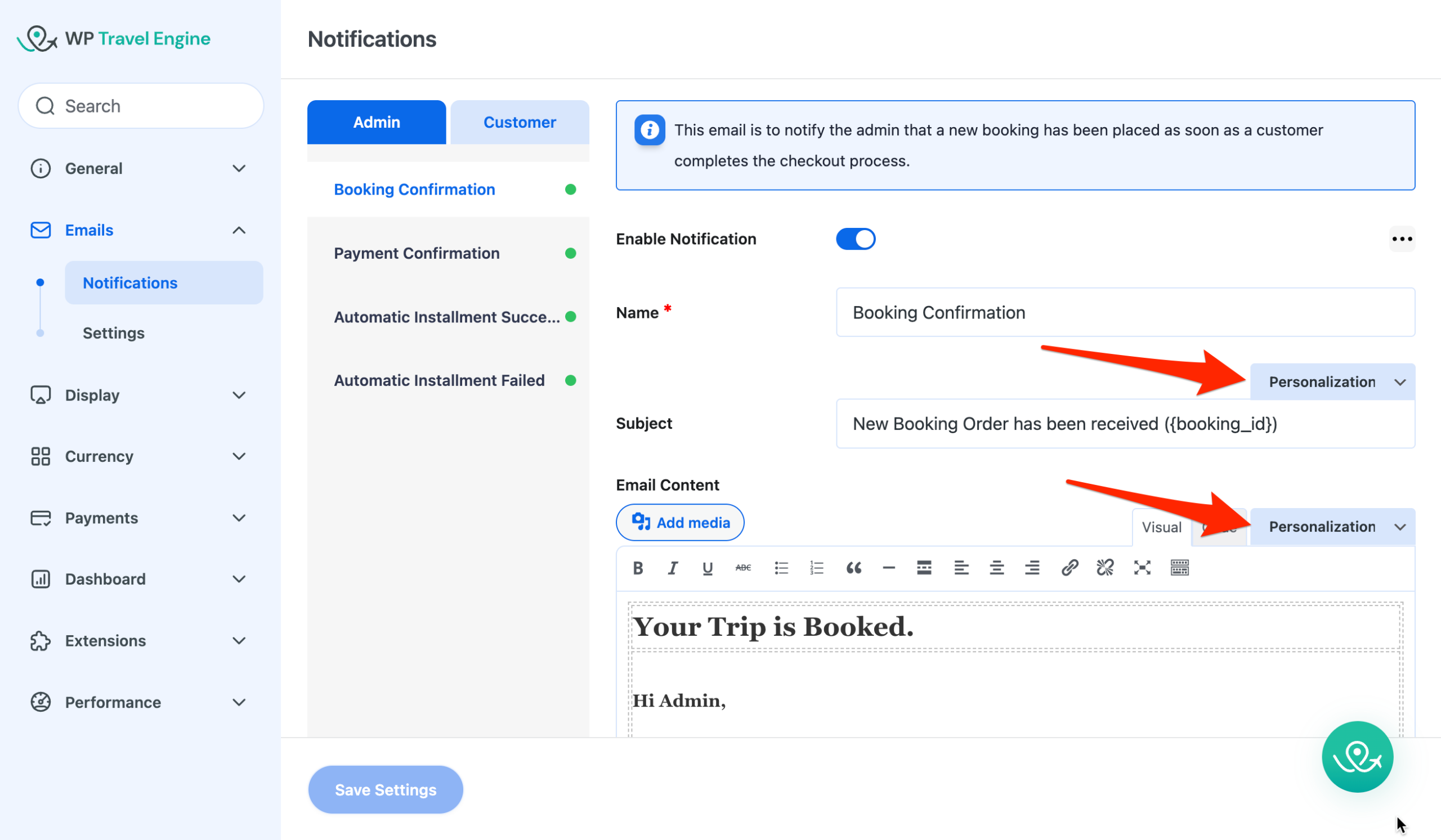
Example:
Hi {customer_first_name},Thank you for booking {booked_trip_name}.
Your trip starts on {trip_start_date}.
When sent, this will automatically display the customer’s real name and trip details.
Important Guidelines #
- Tags must be written exactly as shown (including curly brackets
{ }). - Tags are case-sensitive.
- Do not add spaces inside the brackets.
- Do not modify the tag name.
Available Email Tags #
Below is the complete list of supported personalization tags.
| Tag | Description |
|---|---|
{sitename} | Your site name |
{customer_first_name} | The customer’s first name. |
{customer_full_name} | The customer’s full name. |
{customer_last_name} | The customer’s last name. |
{customer_email} | The customer’s email address. |
{ip_address} | The buyer’s IP Address |
{site_admin_email} | The site admin email address. |
{password_reset_link} | The link to reset the password. |
{booked_trip_name} | The name of the trip booked. |
{booking_id} | The booking order ID |
{payment_id} | The payment ID of the trip. |
{trip_url} | The trip URL for each booked trip |
{trip_code} | The trip code for each booked trip |
{billing_address} | The buyer’s billing address |
{city} | The buyer’s city |
{country} | The buyer’s country |
{booking_url} | The trip booking link |
{tprice} | The trip price |
{traveler_data} | The traveller details: Traveller details and Emergency Contact Details |
{payment_method} | Payment Method used to check out. |
{trip_booking_details} | The trip booking & Payment details. |
{trip_booking_summary} | The trip booking summary. |
{trip_payment_details} | The trip payment details. |
{trip_booked_date} | The date and time when the trip was booked. |
{trip_start_date} | The start date of the trip. |
{trip_end_date} | The end date of the trip. |
{no_of_travellers} | The total number of travellers. |
{trip_total_price} | The total price of the trip. |
{trip_paid_amount} | The amount paid by the customer. |
{trip_due_amount} | The due amount for the trip. |
{billing_details} | The billing details filled by the customer on the checkout page. |
{traveller_details} | The traveler’s details filled by the customer on the checkout page. |
{emergency_details} | The emergency contact details filled by the customer on the checkout template. |
{additional_note} | The additional note filled by the customer on the checkout template. |
{bank_details} | Bank account details. This tag is replaced with your configured bank information and is included in the customer receipt email when the Bank Transfer payment method is selected. |
{check_payment_instruction} | Instructions to make a check payment. |
{trip_extra_fee} | The extra fee for the trip. |
Newly Introduced Tags #
The following tags were introduced to improve the clarity and structure of booking emails:
{trip_booking_details}{trip_booking_summary}{trip_payment_details}{trip_booked_date}{trip_start_date}{trip_end_date}{trip_total_price}{trip_paid_amount}{trip_due_amount}{no_of_travellers}
We recommend using these tags in the new email templates.
Deprecated Tags & Replacements #
Please update older templates using the replacements below:
| Deprecated Tag | Replaced With |
|---|---|
{booking_details} | {trip_booking_details} |
{name} | {customer_first_name} |
{fullname} | {customer_full_name} |
{user_email} | {customer_email} |
{tdate} | {trip_start_date} |
{date} | {trip_booked_date} |
{traveler} | {no_of_travelers} |
{no_of_travellers} | {no_of_travelers} |
{price} | {trip_paid_amount} |
{total_cost} | {trip_total_price} |
{due} | {trip_due_amount} |
{traveler_data} | {traveler_details} |
{traveller_details} | {traveler_details} |