
WP Travel Engine allows you to use a PayPal Standard account as your primary payment gateway.
Please follow these steps to add your PayPal Standard account:
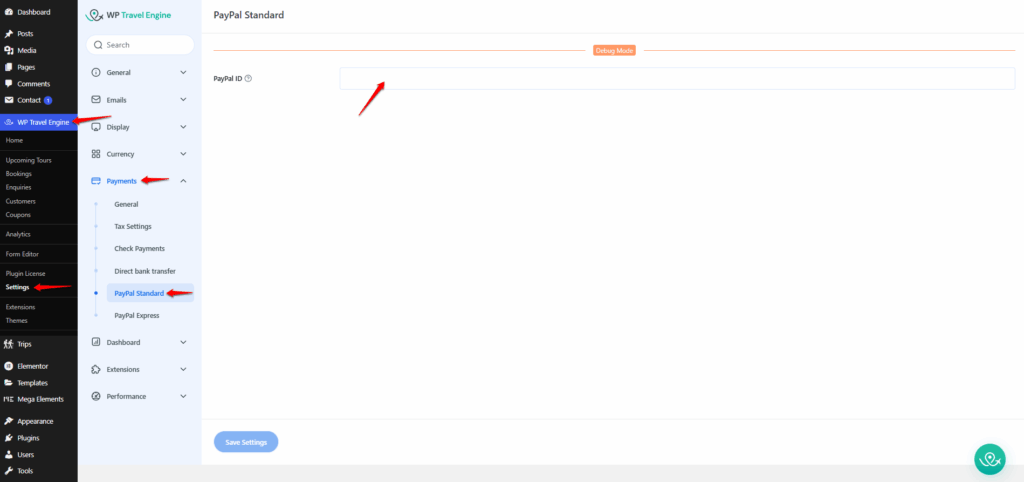
- Log in to your WordPress Dashboard.
- Navigate to:
- Dashboard > WP Travel Engine > Settings > Payments > PayPal Standard
- Enter your PayPal or merchant account ID.
(Note: Make sure the ID is valid, as this will be used to process payments for your trips.) - Save Changes.
- After saving, go to:
- Dashboard > WP Travel Engine > Settings > Payments > General
- Enable PayPal Standard.
(Note: Check the box to make PayPal Standard appear as a payment option during checkout) - Save Changes again.
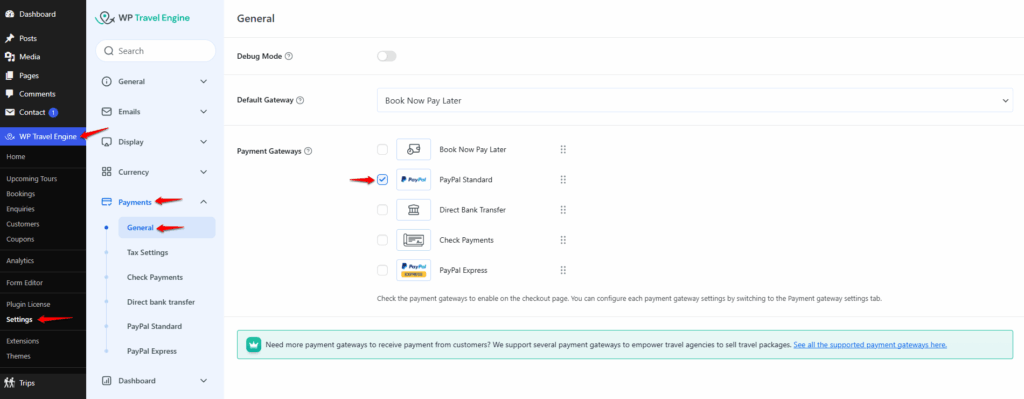
Once completed, PayPal Standard will be available as a payment gateway for travelers to use when booking trips on your site.
(Note: PayPal Standard currently supports transactions only in USD (United States Dollar). Other currencies will not work for receiving payments through this integration.)
Feel free to contact our support team for any other assistance.