
WP Travel Engine offers flexible subscription management for customers using its premium plans. Understanding how subscriptions work ensures a smooth experience and uninterrupted access to plugin features and updates.
1. About the Subscription Process #
All annual plans of WP Travel Engine are set to auto-renew. This ensures that your plugin and its premium features continue working without interruption.
- Renewal Notification: Customers will receive an email reminder approximately one month before the renewal date. This email includes details about your plan, the renewal date, and the renewal amount.
- Automatic Renewal: If no action is taken after receiving the renewal notification, the subscription will renew automatically, and the same payment method used during the original purchase will be charged. You will also be notified through email once the license gets renewed automatically.
2. How to Cancel the Subscription #
You can cancel your subscription directly from your account on our website by following these steps:
- Go to the WP Travel Engine Account Page.
- Log in using your registered email and password. If you’ve forgotten your password, click the ‘Lost Password’ link to reset it. Make sure to use the email associated with your plugin purchase.
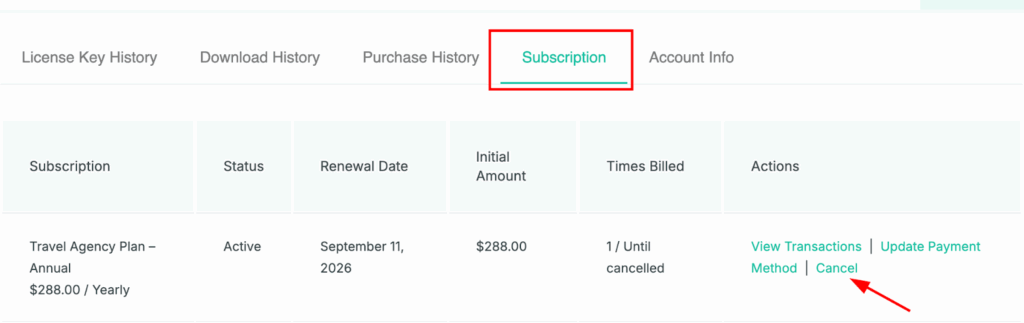
- Once logged in, you’ll see your dashboard. Navigate to the Subscription tab.
- Find the subscription you want to cancel and click the Cancel option.
ℹ️ Note: Cancelling your subscription will stop future automatic renewals, but you will continue to have access to premium features until the end of your current subscription period. If you wish to renew the license in future, you can always visit your account and manually renew the license by making the payment.
3. Can I Get a Refund After Subscription Renewal? #
Yes, WP Travel Engine does provide refunds for automatic renewals if requested within 14 days of the renewal, in accordance with our Refund Policy.
- Refund Fee: A 10% fee is applied to refunds for renewals. This fee covers administrative costs and non-refundable transaction fees.
- Advance Notice: Customers receive an email notification approximately one month before the renewal date. To avoid being charged, you can cancel your subscription before the renewal date.
- How to Request a Refund: If you are eligible, submit the Refund Request Form to initiate the refund process.
ℹ️ Note: Refund requests outside the 14-day period are generally not eligible.
4. What Happens When the Subscription Expires? #
When your subscription expires:
- Access to premium add-ons, features, updates, and support will be suspended.
- Your website will continue to work with the free version of WP Travel Engine, but premium functionalities will no longer be available.
- You can renew the subscription at any time to regain full access.
5. Subscription Renewal Failed or Expired #
In cases where a subscription renewal fails (e.g., due to payment issues) or has expired:
- You will receive an email notification about the failed payment.
- Log in to your account and update your payment information.
- You can then attempt to renew the subscription manually.
Note: Failing to renew on time will result in the suspension of premium features until the subscription is successfully renewed.
6. Can You Renew the Subscription Earlier? #
By default, the renewal option in your account dashboard only appears once the subscription has expired. This means you cannot manually renew your subscription from the dashboard before the expiration date.
However, it is still possible to renew earlier using the following method:
- Our system automatically sends an email notification approximately one month before the subscription expires, reminding you about the upcoming renewal.
- If your subscription was previously cancelled, the email will include a renewal payment link. By clicking this link and completing the payment, you can renew your subscription before the expiration date.
Feel free to contact our support team for any other assistance.