

The Tour Search Widget allows visitors to quickly search and filter trips on your travel website. To use this widget, you must first install and activate the WP Travel Engine – Elementor Widgets plugin.
Download here: https://wordpress.org/plugins/wte-elementor-widgets/
Once the plugin is activated, you can add and customize the Tour Search Widget using the Elementor page builder.
Follow the instructions below to configure the settings: #
These options allow you to choose which taxonomies (filters) you want to display in the Trip Search Widget. Taxonomies help users filter trips based on different criteria.
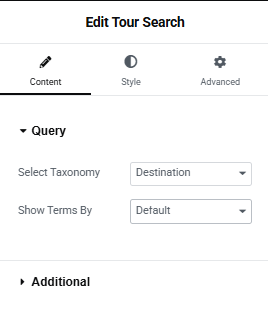
- Select Taxonomy: This option lets you choose which filters (taxonomies) you want to display in the search widget. Taxonomies help users narrow down trips based on specific criteria.
- You can choose from:
- Destination
- Activities
- Trip Types
- You can choose from:
- Show Terms By: This setting controls how the terms inside each taxonomy are displayed.
- Default: Automatically shows all terms from the selected taxonomy.
- Choose From the List: Allows you to manually select specific terms that should appear in the filter.
Additional Settings #
These settings give you extra customization options for the search widget.
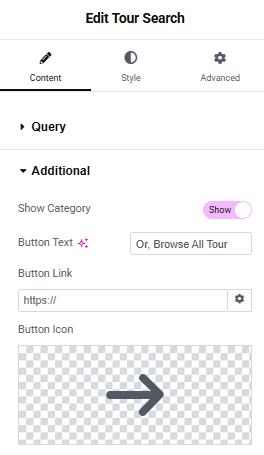
- Show Category: Enable or disable the category filter in the search widget.
- Button Text: Set the label/text that appears on the search button.
- Button Link: Add a custom URL if you want the search button to redirect users to a specific page.
- Button Icon: Add an icon to the button. You can upload an SVG file or choose an icon from the icon library to match your design.
Feel free to contact our support team for any other assistance.