
The Pricing Type feature lets you create custom pricing labels for your trips. For example, you can set pricing per person, per group, per couple, or any other type that suits your packages. This gives you more flexibility when defining how prices are displayed.
How do I add a new Pricing Type? #
To add a new pricing type globally, follow these steps:
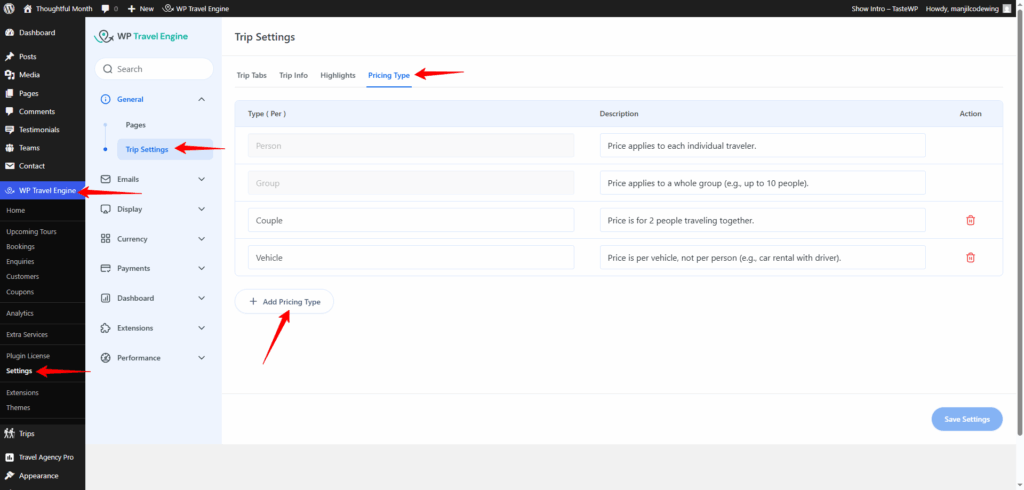
- Go to Admin Dashboard > WP Travel Engine > Settings > General > Trip Settings > Pricing Type
- Click Add Pricing Type
- Under Type (Per), enter your label (e.g., Per Couple)
- Add a description to explain what this pricing type means
- Click Save Settings
How do I use a Pricing Type for an individual trip? #
After you have set up your pricing types globally, you can assign them to a trip:
- Edit the trip you want to update (Trips > All Trips > Edit)
- Go to the Date and Price section
- Click the Packages area
- For each pricing category (like Adult or Child), choose the appropriate Pricing Type from the dropdown menu
Watch the walkthrough video: #
For a quick visual guide, watch our step-by-step video on how to add and use Pricing Types.
Why should I use different Pricing Types? #
Using different pricing types helps you:
- Offer flexible pricing models (per person, group discounts, couple deals, etc.)
- Clearly communicate your pricing structure to customers
- Keep your trip listings organized and easy to understand
Can I edit or remove a Pricing Type later? #
Yes! Just return to Trip Settings > Pricing Type, edit the label or description, or remove it if you no longer need it. Make sure to update any trips using that pricing type.
Feel free to contact our support team for any other assistance.