
Reviews are crucial for both developers and potential users. To leave a review for a WP Travel Engine plugin on WordPress.org, you must have an account.
If you’d like to set up an account on wordpress.org, please follow this particular link.
These guidelines are for users who are currently logged into their wordpress.org accounts. We’re specifically talking about reviewing the WP Travel Engine plugin.
Step 1: Find the WP Travel Engine Plugin on wordpress.org:
Click on this link, and it will take you to the dedicated page for submitting a review.
Step 2: Go to the Reviews Section:
Click the “Add your own review” button.
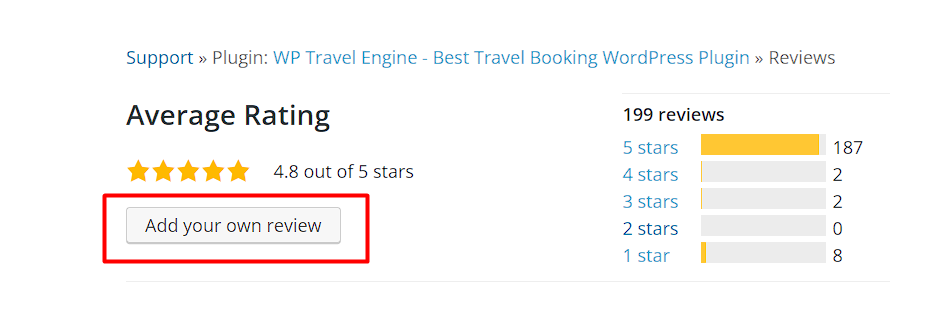
Step 3: Give the Plugin a Rating:
You’ll notice a new section in the screenshot where you can provide a rating and write a review.
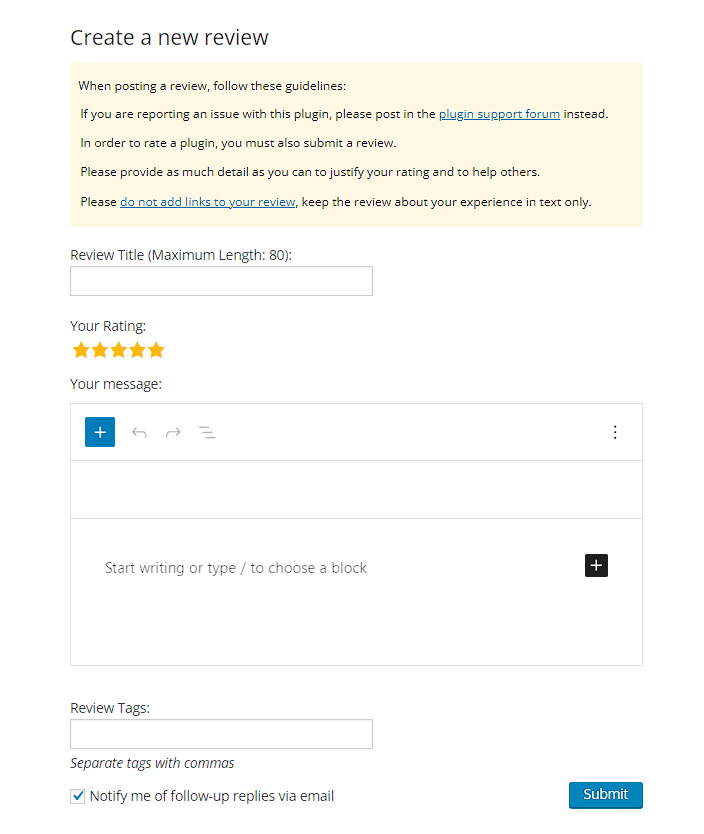
Step 4: Submit Your Review:
- After completing your review, click the “Submit” button.
- Your review will be sent, and it might take some time to appear on the plugin page.
If you appreciate the WP Travel Engine plugin, please share a detailed review and give us a 5-star rating.
Feel free to contact our support team for any other assistance.