

Why Are Only Some of My Trips Showing on the Trip Archive Page?
Find out why some trips are missing from your Trip Archive page and learn how to display all trips, including those without fixed dates.
Why do only some trips appear
If only a few trips appear on your Trip Archive page, the Show Trip only with FSD option is likely enabled. Your trips have not been deleted or removed. The archive page is filtering the list to show only trips with fixed starting dates.
What the Show Trip only with FSD option does
The Show Trip only with FSD option controls which trips appear on your archive pages. FSD means Fixed Starting Date, which is a specific date when a trip begins.
When the option is enabled, only trips with at least one fixed starting date appear on the Trip Archive page. Normal trips without fixed starting dates remain in your website and WordPress dashboard, but the archive page does not display them.
Your trips are not deleted or lost. They still exist in your WordPress dashboard under Trips > All Trips. The archive page is filtering them because the Show Trip only with FSD option is enabled. Disable the option to display them again.
How to display all trips on the archive page
Disable the Show Trip only with FSD option in your WP Travel Engine settings. The exact location can vary by version, so check the settings under WP Travel Engine > Settings or Trips > Settings.
Go to the WP Travel Engine settings
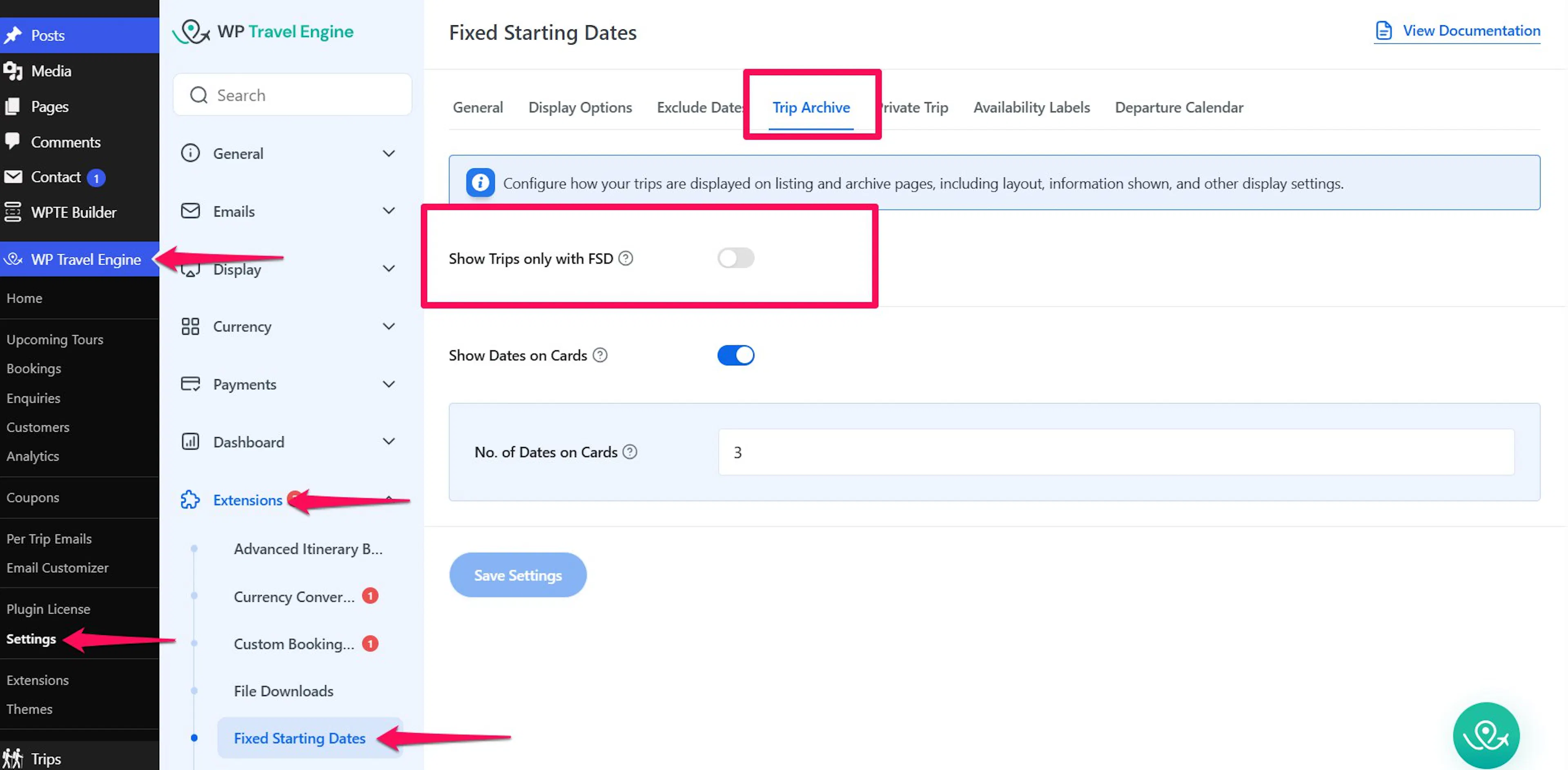
In your WordPress dashboard, use the left sidebar to go to WP Travel Engine > Settings or Trips > Settings. Open the settings tab that contains the trip archive options.
Find the Show Trip only with FSD option
Look for the Show Trip only with FSD toggle in the settings.
Disable the toggle
Turn off the Show Trip only with FSD toggle, so it is no longer active.
Save your changes
Click Save to apply the change.
Once the option is disabled, your archive pages will display all trips, including trips with fixed starting dates and normal trips without fixed starting dates.
If you're still stuck or have a question we didn't cover, our support team is happy to help. Reach out at our support page and we'll get you sorted.